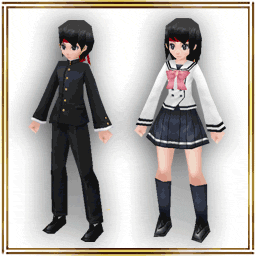
The Heavenly costume is here for only 7 days!(6-26 00:00)

Two other costume boxes are also here for only 7 days!


- Sales Period -
From: 6/26/2026 14:00 JST.
Until: 7/3/2026 13:59 JST.

*The image is only for reference and may differ from the actual item.
*When making a purchase from the costume box, you will receive 1 item from the box at random.
*Please check the lineup on the purchasing screen for details about each item.
*Please note that you may get duplicates when drawing.
*This sale is planned to send on 7/3/2026 13:59 JST.


- About item shop images -
If your device's image cache has not been updated, older images may be displayed.

- When you tap the costume box banner, the product is different from the banner you transitioned from.
- When you tap the first-time sale banner, the product is not on sale.

If you encounter the problems listed above, the most recent images can be loaded by reinstalling the app.

Please be aware of data that may be reset by reinstalling. We recommend taking screenshots of your Set Phrases.

- About Resets When Uninstalling the App

Please check the announcement before making your purchase.

Only 24 hrs! The Tsuchinoko Break raid battle is here!(6-25 08:00)

Tsuchinoko Break

- What is the "Tsuchinoko Break" raid battle? -
How to Join 1

A "Tsuchinoko" is considered to be an unidentified mysterious animal, or a cryptid, in Japan.

In Japan, it is still known to be an illusive creature, and in some areas, there is even a reward for finding one.

As one of the kanji characters for "Friday" is used in the kanji characters for the creature "Tsuchinoko", we will hold the special Tsuchinoko raid battle on Fridays.

The Tsuchinoko will appear every Friday from 0:00 to 23:59 (JST) for only 24 hours.

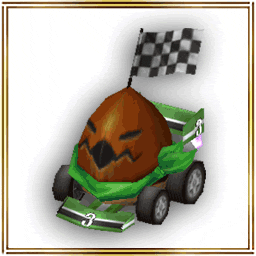
Defeat the boss monster "Tsuchinoko King" for a chance to get the "▲Tsuchinoko King" Al Crysta and the "Tsuchinoko King Egg" that hatches a pet that you can raise on your Island.


- How to Join -
How to Join 2
During the event, you can challenge the raid battle as a guild or group from NPC "Alen" in Rokoko City.

- Obtainable Items -

- Pet "Tsuchinoko King Egg" -
Tsuchinoko King will come out from it. Let's hatch it on the island!

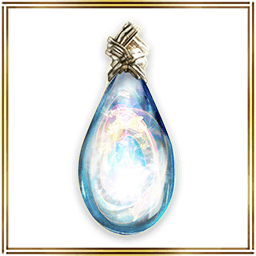
- Al Crysta "▲Tsuchinoko King" -
Delay-0.5 sec MaxHP&MP+5% ATK&MATK+5%
All stats +5, Melee&Magic R +5%

- Starting Date -
Friday from 0:00 to 23:59 (JST) for only 24 hours.

The event is on every Friday, so feel free to join!

Updated Information (6.4.8)(6-25 05:08)

The App update has been successfully completed. Please download version "6.4.8" from "Google Play".

- Bug Fixes -
- Fixed an issue where phrases do not function properly if there is a space in the item name.
- Fixed an issue where spaces cannot be entered in the body of a mail.

Thank you for your cooperation.

Updated Information (6.4.7)(6-25 01:10)

The App update has been successfully completed. Please download version "6.4.7" from "Google Play".


- Updated to the Unity Version! -
App Update

The app has been released with the Android and iOS development environments migrated to "Unity".

- Update Details -
1. Added 60fps to System Settings (Frame Rate) for smoother gameplay display!
2. Coin Item page is now categorized by item type for better visibility!
3. Certain claimable items in the Coin Item page can now be withdrawn in bulk!
4. Trade slots expanded from a maximum of 4 types of items to 5!
5. Guild Quests updated to be automatically accepted and reported!
6. A duration bar is now displayed for field effects that inflict damage after a certain period during battle!


Please check our official site or the in-app news for more details.
- Updated to the Unity Version!

- Devices Unsupported in the Unity Version -
Smartphones with the following OS versions will no longer be supported or guaranteed to operate.

Android
- OS versions prior to "Android 7.1"

*If you are using "Android 7.0" or lower, you will need to update your OS version.

iOS
- OS versions prior to "iOS 15.0" and "iPadOS 15.0"

*If you are using "iOS 14.8.1" / "iPadOS 13.7" or lower, you will need to update your OS version.

- Migration from Android to Android Devices -
You can continue to play using your currently registered Google account.

- Migration from iOS to iOS Devices -
Please back up your current device, then restore the backed-up data on your new device.

- Backup/Restore Play Data for iOS

- New high difficulty has been added to Boss "False Grecia"! -
False Grecia

Please enjoy the newly added high-difficulty boss battle!

Starting Location for New Difficulty: Inje Caves: Deepest Part "???"

- Challenge the New High-Difficulty Boss "False Grecia"! -
There is a chance to obtain the new weapon "False Goddess Remains" from the boss "False Grecia". Furthermore, you also have a chance to obtain a new Relic Crysta.

False Goddess Remains
Weapon (Rod): False Goddess Remains
ATK:332-342 DEF:6 Slot:0-2 Trade×
Dark element Melee&Magic R+10%
MATK+30% Heal reward+15% Hate rise+20%
Magic counter chance by defense


- Major Graphic Refinement for Maps "Inje Enclave" and "Inje Caves"! -
Inje Enclave

Inje Caves

The graphics have been significantly refined, allowing you to enjoy your adventure in the world of Iruna more than ever before.

- High-Definition Refined Maps -
- Inje Enclave, Inje Caves

- Other Updates -
- Creating Equipment has been added.
Added a new item in Minaula City.
- Strengthening Equipment has been added.
Added new items in Pillared Corridor and Lustig Castle Town.
- Added "Clear Cache" Button to the Title Screen Menu.
Previously, reinstalling the app was required to delete resource data, but we have now added a "Clear Cache" button to do so directly.
- Updated the License Agreement page on the official website.

- System Settings Update -
- Added "HP Bar Scale Display" and "HP Percentage Display" to the Battle Settings.
This setting adds information displayed on the enemy's HP bar.
- Added "Fast Target Switching" to the Battle Settings.
This setting allows you to change the automatic targeting behavior during battle.
- Added a double-tap shortcut setting to the "Battle Settings" in System Settings.

*The newly added settings are account-wide (shared across all characters).

- Adjustments -
- Adjusted text across the Production system to change "Production" to "Strengthening" when upgrading equipment.
- In Production strengthening, changed specifications to allow execution even when the inventory is full.
- Adjusted the recovery amount of the recovery items "Revita (S)" and "Revita (M)".

- Bug Fixes -
- Fixed a bug where the base ATK of the weapons "Sauro Stick G5" and "Sauro Fang G5" was set 10 points too high.
- Fixed a bug where the effect interval of the recovery item "Soup Stock" was too long.
- Fixed a bug where unequipable shapes were randomly selected for the Relic Crysta "□Magic Pierce +3%".
- Fixed the avatar (additional) "Colon Mask (Front)" to be untradeable.

Thank you for your cooperation.

Updated to the Unity Version!(6-25 01:08)

App Update

The app has been released with the Android and iOS development environments migrated to "Unity".

- Update Details -
1. Added 60fps to System Settings (Frame Rate) for smoother gameplay display!
2. Coin Item page is now categorized by item type for better visibility!
3. Certain claimable items in the Coin Item page can now be withdrawn in bulk!
4. Trade slots expanded from a maximum of 4 types of items to 5!
5. Guild Quests updated to be automatically accepted and reported!
6. A duration bar is now displayed for field effects that inflict damage after a certain period during battle!


* In-game text fonts cannot be changed due to system specifications.


- 1. Play with 60fps for Smoother Gameplay Display! -
Depending on your device's performance, the game graphics will display and run much smoother!

You can change the Frame Rate from 30 to 60 via Main Menu > Settings > System > Category "System Settings".

* If the game feels laggy, please set it to 30fps.

- 2. Coin Item Page Now Supports Categorized Display! -
The Coin Item page has been updated to display items divided into categories: "Consumables", "Items", "Avatars", "Equipment", and "Others".

This reduces the time and effort required to find your Coin Items.

- 3. Certain Claimable Items Can Now Be Withdrawn in Bulk! -
You can now adjust the quantity of certain claimable items when receiving them!

- 4. Trade Slots Expanded to a Maximum of 5 Item Types! -
The number of tradable item slots per trade has been updated from "4 types" to "5 types"!

- 5. Automated Guild Quest Acceptance & Reporting! -
Guild Quests will now be automatically accepted on Mondays without needing to talk to the NPC in the Guild Home.

When you complete a Guild Quest, it will automatically switch to the completed status.

You can claim your Guild Point rewards via Main Menu > Character > Quests > Guild.

- 6. Duration Bar Displayed for Field Effects and Timed Damage! -
A duration bar will now be displayed for field effects in certain boss battles.

Examples:
- "Colon Seed" in the Boss "Gigant Colon" battle
- "Wind Elemental" in the Boss "Blauzen" battle (High Difficulty)

- Notes on Migration -
Character data will be migrated as is, but please review your "System Settings" after updating the app.

- Data That Will Not Be Carried Over -
- System Settings (Detailed ON/OFF environment configurations)
- Character Sorting Settings
- Chat Filter Settings
- Menu Layout Editing
- Favorite Production Recipes
- Pet Sorting Settings
- Pet Order Re-arrangement Settings

- About Shortcut Settings -
You can restore your shortcut settings saved in your character data by using "Load Shortcuts" under Settings in the Main Menu.

- Request for Performance Check -
Immediately after starting the game, the app may feel laggy, or you may feel a sense of discomfort regarding controls and visibility.

You can adjust the app's performance environment via Main Menu > Settings > System.

Here are some example settings. Please change them to lower-load configurations that match your device's specifications.

- If the Game Runs Slowly -
- Change the Frame Rate from 60 to 30 via Main Menu > Settings > System > Category "System Settings".
- Lower the Screen Resolution (3D) setting from 1x down to 0.5x via Main Menu > Settings > System > Category "System Settings".
- Turn ON "Show Party Only" via Main Menu > Settings > System > Character Display.
- Lower the "No Limit" slider under "Max Characters" to reduce the number of displayed players via Main Menu > Settings > System > Character Display.

- If the Shortcut Buttons Are Too Small -
- You can adjust the shortcut button size from 1x up to a maximum of 1.2x via Main Menu > Settings > System > Category "Battle Settings".

- If the Camera Rotation Is Too Slow -
- You can increase the Camera Sensitivity up to a maximum of 2x via Main Menu > Settings > System > Category "Map Display".

- Added "Clear Cache" Button to the Title Screen Menu -
Previously, reinstalling the app was required to delete resource data, but we have now added a "Clear Cache" button to delete resource data directly.

- Unity Version Update Commemorative Item Giveaway! -
Commemorative items are now available for free in the Item Shop!


- Mascot: "Noctor"

By using this item from the Coin section, you can equip the added mascot via Main Menu (top left) > Character > Mascot.

Equip Slot: Head
Bonus Effect: EXP Boost


- Island Object: "Memorial Cake"

A memorial cake that can be placed on land in your Island.

*Limited to one claim per account.

- Free Distribution Period -
From: Wednesday, June 24th, 2026 after maintenance
Until: Tuesday, July 28th, 2026 before maintenance


 Past notifications Latest notifications