
[OTHERS] Treasure Box 380 Campaign!!(3-10 03:00)


*Tap the image and jump to the Item Shop.

Treasure Box 380 Campaign will be held for a limited time!

The chance to get rare drop rate boosting items will be doubled!

- Campaign Items -

Curonne's Book
Rarity: 4 Stars

Increases the character's Rare drop rate by 50.
Lasts 15 minutes.
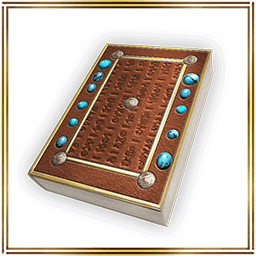

Gral's Book
Rarity: 4 Stars

Increases the character's Rare drop rate by 25.
Lasts 30 minutes.

The winning rate of the items above is doubled for a limited time!

- Note -
*You cannot redundantly use the same items.
*The time-limited items can be used up to 5 types simultaneously.
*The duration of the items will be consumed while you are logging out.

- Special Offer Period -
From: March 10th at 0:00 am (PST/GMT-8)
Until: March 12nd at 23:59 pm (PST/GMT-8)

*The schedule is subject to change.
*You may get the same items by opening the box.

Check the details in the !

Iruna Team

[UPDATE] Update Information (3.1.8E)(3-9 06:45)

The app update has been successfully completed.

The latest version of the application is "3.1.8E".

Please download version "3.1.8E" from "Google Play".


- Update Details -

- Mission: "The Mark and Singing Voice" has been added.
- Field Map has been added.
- Dungeon Map has been added.

- White Day Event will be held.

From: After the maintenance on March 9th
Until: March 31st at 7:59 am (PDT/GMT-7)

You can go to the event venue by talking to "GM Neints" in Rokoko City.

The recipes for Production and prizes in the event venue have been updated.

- Added White Day Quests in "Rokoko City", "Teschen Highlands".

- Hinamatsuri has ended.


- Bug Fixes -

- Unable to attack boss from a certain distance.

- Unable to search for items with half-width space in Stall.


- How to Take Screenshots -

We made an adjustment to the function of "Back" button from ver. 3.0.7E.

You can take screenshots by changing the back key setting in game with the following steps.

MENU > Settings > System > Other > [Back Key Setting] "OFF"


- Installing App from "Google Play" -

It may take time to download the new app from "Google Play" if the devices have updated "Google Play".

If the new app is not updated, please check "Google Play" later.

If the new app is not still updated after a while, please try uninstall and reinstall the app.

Thank you for your cooperation.

Iruna Team

[MAINTENANCE] Additional Maintenance Extention Notice(3-9 04:07)

Thank you for playing Iruna Online.

We are sorry, maintenance was re-extended for the update.

The scheduled maintenance on March 8th was planned to end on March 9th at 1:00 am (PST/GMT-8), but we need to extend the maintenance.

Currently, we are working on the update, please wait bit longer, the ending time will be announced.

Thank you for your understanding and cooperation.

Iruna Team

[OTHERS] "Wind Ark" Campaign!(3-9 03:00)


*Tap the image and jump to the Item Shop.

- Wind Ark Campaign -

"Wind Ark (Set of 10)" will become "Wind Ark (Set of 20)" for a limited time!

- Campaign Period -
From: March 9th at 0:00 am (PST/GMT-8)
Until: March 13rd at 23:59 pm (PDT/GMT-7)

*Wind Ark (Boss) is NOT included in this campaign.

Go check the !

Iruna Team

[MAINTENANCE] Maintenance Extension Notice(3-8 05:55)

Thank you for playing Iruna Online.

The scheduled maintenance on March 8th will be extended for 2 hours.


- Schedule -

From: March 8th at 10:00 pm (PST/GMT-8)
Until: March 9th at 1:00 am (PST/GMT-8)


- Maintenance Details -

- Inspection and maintenance of server equipment
- Suspension of features on the Item Shop site due to the maintenance

*During the maintenance, all functions in the Item Shop will be unavailable.


- Update Details -

- Mission will be added.
- Field Map will be added.
- Dungeon Map will be added.
- White Day Event will be held.
- Hinamatsuri will end.


- Event Information -

- Hinamatsuri is held.

From: February 29th at 7:00 am (PST/GMT-8)
Until: March 9th at 10:00 pm (PST/GMT-8)

EXP gain for female characters will increase by 10% when defeating monsters.


- How to Take Screenshots -

We made an adjustment to the function of "Back" button from ver. 3.0.7E.

You can take screenshots by changing the back key setting in game with the following steps.

MENU > Settings > System > Other > [Back Key Setting] "OFF"

*Please note that the update details and maintenance schedule may be changed.
We cannot answer questions about the details of the updates.

*Please Log out of the game before the maintenance begins.
If you are still playing when maintenance begins, the items you obtained may not be saved properly.
For the items that are in effect, the effects may run out during maintenance if you use them before maintenance.

Iruna Team


 Past notifications Latest notifications