
This is an announcement from the Iruna Team.
We will hold EXP +50% Boost Campaign from Saturday, April 4th, 2020 at 3:00 AM (PDT/GMT-7)
Campaign Details:
1. EXP +50% Boost Campaign
From: April 4th at 3:00 AM (PDT/GMT-7)
Until: April 4th at 6:00 AM (PDT/GMT-7)
Login and gain EXP +50% boost effect!
Notes:
*Buff effects from Monthly Ticket bonus, EXP gain Item, EXP gain equipment, Fortune-Telling result will overlap.
*The EXP buff will not be applied if you reach a fixed level.
*The EXP buff will not be applied if you reach character's Lvl Cap.
*The EXP buff will not be applied to Mission EXP and Quest EXP.
We hope you enjoy the campaign!
"Open 10 boxes" discount price at your first-time purchase!!
- Sales period -
From: April 3rd at 0:00 AM (PDT/GMT-7)
Until: April 9th at 23:59 PM (PDT/GMT-7)
*"Violet Avenger Box" will be removed from the Item Shop on April 9th at 23:59 PM (PDT/GMT-7).
*If you have 10 or more Box Tickets, "One Time Discount" will not appear on "Open 10 boxes" button.
Please note that this campaign will be applied only when you don't have Box Tickets.
*Box Tickets will be preferentially consumed if you have 10 or more Box Tickets even if you have enough Coins to purchase "Open boxes".
*You may get the same items by opening the box.
- Special Item Added in Treasure Box 380! -
The following item will be added in "Treasure Box 380".
Claw Master Hammer : Adds 1 slot to a equipped 1-slotted Claw.
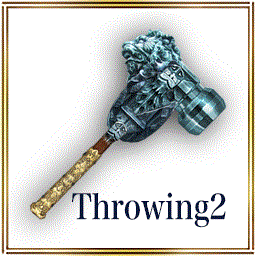
Throwing Master Hammer : Adds 1 slot to a equipped 1-slotted Throwing.
- Special winning rate for a limited time -

Rarity: 5 Stars
Claw Master Hammer (Single)
Adds 1 slot to a equipped 1-slotted Claw.
*You can move it to Consumables from Coin section by using it.
*Available only on 1-slotted Claws.
*It will be not consumed even if you use it on the Claws that don't have 1 slot.
Rarity: 5 Stars
Throwing Master Hammer (Single)
Adds 1 slot to a equipped 1-slotted Throwing.
*You can move it to Consumables from Coin section by using it.
*Available only on 1-slotted Weapons.
*It will be not consumed even if you use it on the Weapons that don't have 1 slot.
- Campaign Period -
From: April 3rd at 0:00 AM (PDT/GMT-7)
Until: April 5th at 23:59 PM (PDT/GMT-7)
*You may win the same items by opening the boxes.
Don't miss this chance!
"Open a box" discount price at your first-time second-time and third-time purchase!!
- Sales period -
From: April 3rd at 0:00 AM (PDT/GMT-7)
*If you have 1 or more Box Tickets, "One Time Discount" will not appear on "Open a box" button.a
Please note that this campaign will be applied only when you don't have Box Tickets.
*The discount will be applied to "Open a box" only.
It will NOT be applied to "Open 10 boxes".
*Box Tickets will be preferentially consumed if you have 1 or more Box Tickets even if you have enough Coins to purchase "Open boxes".
*You may get the same items by opening the box.
*We will announce the ending date and time of the sale later.
"Open a box" discount price at your first-time second-time and third-time purchase!!
- Sales period -
From: April 3rd at 0:00 AM (PDT/GMT-7)
*If you have 1 or more Box Tickets, "One Time Discount" will not appear on "Open a box" button.a
Please note that this campaign will be applied only when you don't have Box Tickets.
*The discount will be applied to "Open a box" only.
It will NOT be applied to "Open 10 boxes".
*Box Tickets will be preferentially consumed if you have 1 or more Box Tickets even if you have enough Coins to purchase "Open boxes".
*You may get the same items by opening the box.
*We will announce the ending date and time of the sale later.
| Past notifications | Latest notifications |