Super Slot Set (Staff) Treasure Box Campaign !(9-11 00:01)


- The Treasure Box, available for a limited time only! -
Here comes the "Super Slot Set (Staff)", a set of Staff Master Hammer and Smith's Hammer!

- Special Item Added in Treasure Box 380! -
The following item will be added in "Treasure Box 380".
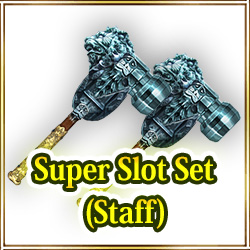
Rarity: 5 Stars
Super Slot Set (Staff): This is a set of the items Staff Master Hammer and Smith's Hammer.

Staff Master Hammer : Places 2 slot in equipped Staff.For 1-slot Staff only.
Smith's Hammer : Places 1 slot in equipped weapon.For 0-slot weapons only.

*You can move it to Consumables from Coin section by using it.
*Staff Master Hammer : Available only on 1-slotted Staffs.
*Staff Master Hammer : It will be not consumed even if you use it on the Staffs that don't have 1 slot.
*Smith's Hammer : You can use it only on 0-slotted Weapon.
*Smith's Hammer : The item will not be consumed even if it is used on the items other than 0-slotted Weapon.

- Campaign Period -
From: September 11th at 0:00 AM (PDT/GMT-7)
Until: September 13th at 23:59 PM (PDT/GMT-7)

*You may win the same items by opening the boxes.

Don't miss this chance!

New Costume Box Rose Serafiknight Box and Heavenly Box!(9-11 00:00)


"Open a box" discount price at your first-time second-time and third-time purchase!!

- Sales period -
From: September 11th at 0:00 AM (PDT/GMT-7)

*If you have 1 or more Box Tickets, "One Time Discount" will not appear on "Open a box" button.
Please note that this campaign will be applied only when you don't have Box Tickets.
*The discount will be applied to "Open a box" only.
It will NOT be applied to "Open 10 boxes".
*Box Tickets will be preferentially consumed if you have 1 or more Box Tickets even if you have enough Coins to purchase "Open boxes".
*You may get the same items by opening the box.
*We will announce the ending date and time of the sale later.

Regarding App Compatibility with Android 11(9-10 00:15)

Thank you for playing Iruna Online.

The release of Android 11 has been announced by Google Inc.

We are planning to confirm Iruna Online app compatibility after Android 11 is released.

We would like to announce the results after all the checks are done.

Therefore, please note that devices with Android 11 will not be supported after the release for a while.

Please refrain from updating OS update until Iruna Online becomes compatible with Android 11.

We thank you for your understanding and cooperation regarding this matter.

*We cannot guarantee that the app runs on testing version such as public beta version.
We are unable to support any issues on our apps caused by installing beta software.

Stefly's Book (Set of 3)(480 coins) added in the Item shop !(9-10 00:00)


We're announcing "Stefly's Book (Set of 3)(480 coins)" added in the Item shop !

*Stefly's Book (Set of 3) can be purchased only once and cannot be purchased second time. One purchase per account.

-About "Stefly's Book"
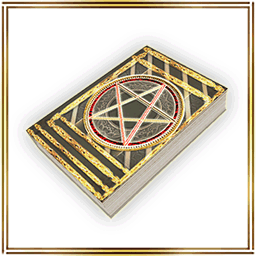
You can redistribute the used stat points (distributed status points will reset) of the character. (Single use only)

- Campaign Period -
From:September 10th at 0:00 AM (PDT/GMT-7)
Until:September 30th at 23:59 PM (PDT/GMT-7)

Updated Information (5.5.0E)(9-9 01:55)

The App update has been successfully completed.

The latest version of the application is "5.5.0E".

Please download version "5.5.0E" from "Google Play".

- Update Details -
- We have introduced the new feature, "Spina Bank".
- New Levels has been added in "Ice Tower of Death".
You can go to the dungeon map by talking to Telesa in Rokoko City.
- Creating Equipment has been added.
Added a new item in Maldario Downtown.
- Strengthening Equipment has been added.
Added a new item in Rokoko City.
- Destinations of Wind Ark has been added.

- New Item "Spina Bank"! -
The following are some examples situations where might use a 1G Spina Gold Note.

- Useful as an item for trading with others.
- Useful for changing Spina to Gold Notes for storing, when you reach the maximum amount of Spina you can hold.

1G Spina Gold Notes can be converted at the to 1G Spina at the Spina Bank or Gold Spina Bank.

- New Item "Spina Bank (0 coin)"! -


This is an island object that makes and converts Gold Notes. The bank converts Spina and Gold Notes, but it charges a fee for the conversion.

Please purchase the "Gold Spina Bank" to use the feature for sharing Spina across your account. The Gold Spina Bank does not charge a fee for making Gold Notes or converting Gold Notes.

- How to Use
Once you have placed the Spina Bank on the island, walk towards it until the target ring appears and tap "Spina Bank" to use it.

*Only the owner of the island where the object is placed can use it.
*Only 1 can be received per account.
*This is a free item.

- New Item "Gold Spina Bank (1280 coins)"! -


This is an island object that allows you to make and convert Gold Notes, as well as store Spina. There is no fee for converting Spina and Gold Notes.

The "Gold Spina Bank" is a feature that allows you to share Spina across your account.

The initial amount of Spina that can be stored is 1G. Additionally, this amount can be expanded +1G with 1 Shared Spina Expansion Token. You can store up to a maximum amount of 10G with 9 Shared Spina Expansion Tokens.

- How to Use
Once you have placed the Gold Spina Bank on the island, walk towards it until the target ring appears and tap "Gold Spina Bank" to use it.

*Only the owner of the island where the object is placed can use it.
*Only 1 can be received per account.

- New Item "Shared Spina Expansion Token (220 coins)"! -


This is a token that expands the amount of Spina that can be stored in the Gold Spina Bank by 1G.
One Shared Spina Expansion Token can be used to expand the storage limit by 1G.

You can purchase up to a maximum of 9 Shared Spina Expansion Tokens.
You can expand from the original 1G all the way up to a maximum of 10G.

*Once you purchase the item, it will be added when you log in again.
*Expansion data will be preserved even if the character is deleted.

- EXP +50% Boost Campaign is Held!

From: After the scheduled maintenance on September 8th
Until: Before the scheduled maintenance on September 15th

*Buff effects from Monthly Ticket bonus, EXP gain Item, EXP gain equipment, Fortune-Telling result will overlap.
*The EXP buff will not be applied if you reach a fixed level.
*The EXP buff will not be applied if you reach character's Lvl Cap and Stats Lvl Cap.
*The EXP buff will not be applied to Mission EXP and Quest EXP.

- Production+20% Boosting Campaign is Held!

From: After the scheduled maintenance on September 8th
Until: Before the scheduled maintenance on September 15th

Success rates on Production efficiency will be increased by 20%.
Producting Skill's EXP acquisition rate will be increased by 20%.
Producting Item loss rates will be decreased by 20%.

*The campaign effect will be reflected in "Gold Dust", "Gold Pebble", "Gold Nugget" but there will be a certain limited on maximum success rate.
*Items used for production may be lost if production fails.
*Even in the case of strengthen, if the production fails, items of the material may be lost.
*Slot may be added to equipment depending on result of production.
*Please note that if the slot is lost, the Crysta that's with the equipment may disappear too.
*Success result, failure result, EXP lost and Item lost due to the failure, will be displayed in the Log so please check.
*If you produce an Item with lower productivity level than your own production level, EXP will not count.
*Recipe will not always be added when your production skill level rises. There are some levels where recipes will not be added.

- Movement speed +20% Campaign is Held!

From: After the scheduled maintenance on September 8th
Until: Before the scheduled maintenance on September 15th

Character movement speed + 20%!

- Other -
- Updated the app icon.
- Enemy EXP UP Campaign has ended.
- Drop Rate+50% Boost Campaign has ended.

- Event Information -
- La Tomatina Event is held!

From: After the maintenance on August 25th
Until: Before the maintenance on September 15th

Rokoko City is decorated with tomatoes and flags!
You can go to the event venue by talking to "Neints" in Rokoko City.
You can play the event quests and exchange tomatoes for items.

- Concerning Limited Function of the Main Menu -
During our update on June 26, 2019 (Weds) we adjusted the timing of the release of a portion of the main menu in the top right.

From the tutorial at the beginning of the game until the the mission "Monster Taskforce" is cleared, we have limited the available functions of the main menu on the top left.

By completing the mission "Monster Taskforce", all functions of the main menu can be used.

Until the mission is cleared, some of the functions of the main menu cannot be used.

- Installing App from "Google Play" -
Please try the following steps if update is required again after updating the app.

1. Reboot your Android device
2. Tap Settings > Apps > Google Play Store
3. Tap "CLEAR CACHE"
4. Tap "CLEAR DATA"

*Please change the device settings at your own responsibility.
*Please ask the manufacturer about how to control the device.

- The following systems will be reset by deleting the app -
- Settings on Phrases
- The order of buttons in MENU

Please note that deleting the app will reset the settings above.
You will need to set again after re-installing the app.

Thank you for your cooperation.
Iruna Team


 Past notifications Latest notifications