
Super Slot Set (Staff) Treasure Box Campaign !(10-9 00:02)


- The Treasure Box, available for a limited time only! -
Here comes the "Super Slot Set (Staff)", a set of Staff Master Hammer and Smith's Hammer!

- Special Item Added in Treasure Box 380! -
The following item will be added in "Treasure Box 380".
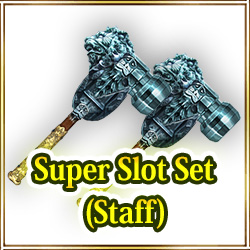
Rarity: 5 Stars
Super Slot Set (Staff): This is a set of the items Staff Master Hammer and Smith's Hammer.

Staff Master Hammer : Places 2 slot in equipped Staff.For 1-slot Staff only.
Smith's Hammer : Places 1 slot in equipped weapon.For 0-slot weapons only.

*"Use" the item to move it to Consumables from the Coin section.
*Staff Master Hammer : Available only on 1-slotted Staffs.
*Staff Master Hammer : It will be not consumed even if you use it on the Staffs that don't have 1 slot.
*Smith's Hammer : You can use it only on 0-slotted Weapon.
*Smith's Hammer : The item will not be consumed even if it is used on the items other than 0-slotted Weapon.

- Campaign Period -
From: October 9th at 0:00 AM (PDT/GMT-7)
Until: October 11th at 23:59 PM (PDT/GMT-7)

*You may win the same items by opening the boxes.

Don't miss this chance!

New Costume Box Dark Night Box!(10-9 00:01)


"Open 10 boxes" and get "Halloween Cap"!!


"Open a box" discount price at your first-time second-time and third-time purchase!!

- Sales period -
From: October 9th at 0:00 AM (PDT/GMT-7)

*If you have 1 or more Box Tickets, "One Time Discount" will not appear on "Open a box" button.
Please note that this campaign will be applied only when you don't have Box Tickets.
*The discount will be applied to "Open a box" only.
It will NOT be applied to "Open 10 boxes".
*Box Tickets will be preferentially consumed if you have 1 or more Box Tickets even if you have enough Coins to purchase "Open boxes".
*You may get the same items by opening the box.
*We will announce the ending date and time of the sale later.

New Costume Box Qipao Box!(10-9 00:00)


"Open a box" discount price at your first-time second-time and third-time purchase!!

- Sales period -
From: October 9th at 0:00 AM (PDT/GMT-7)

*If you have 1 or more Box Tickets, "One Time Discount" will not appear on "Open a box" button.
Please note that this campaign will be applied only when you don't have Box Tickets.
*The discount will be applied to "Open a box" only.
It will NOT be applied to "Open 10 boxes".
*Box Tickets will be preferentially consumed if you have 1 or more Box Tickets even if you have enough Coins to purchase "Open boxes".
*You may get the same items by opening the box.
*We will announce the ending date and time of the sale later.

Changes to the Google Play Subscription System(10-7 02:00)

Thank you for playing Iruna Online.

We have made some adjustments to our system when Google Play subscriptions fail to process renewals.

When a subscription fails to be continued due to insufficient balance or other reasons, a "Checking Payment" message will now appear on the subscription purchase page.

If you see a "Checking Payment" message displayed on the subscription page, please visit the following URL and check your Google Play subscription purchase information.
https://play.google.com/store/account/subscriptions

You will be able to resume your pending subscription by updating your subscription information with a valid payment method.

If your subscription information is not displayed, please switch Google Play accounts.

If your OS is a newer version
- Tap the icon at the top right of the home screen of "Google Play" or "Play Store".

If your OS is an older version
- Tap the triple bar icon at the top left of the home screen of "Google Play" or "Play Store".
- Tap the icon to the right of your account name in the the menu.

If you have any questions, please contact us via our official site or from the title page>"Shop">"Customer Support" at the bottom.

We thank you for your continued support and hope you continue to enjoy Iruna Online.

Updated Information (5.5.2E)(10-7 01:50)

The App update has been successfully completed.

The latest version of the application is "5.5.2E".

Please download version "5.5.2E" from "Google Play".


- Update Details -
- Academy Event part 4! Added "Chaos! Iruna Culture Festival!"

From: After the maintenance on October 6th
Until: Before the maintenance on October 20th

- Requirements to start "[Chaos! Iruna Culture Festival! ]" -
By entering from the gate of the Micerne Plains, you may accept the Quest "Chaos! Iruna Culture Festival!" by talking to Alicia, Minette or Tapicora.

*To exchange "Stall Ticket", which can be obtained from the Cultural Festival Event, talk to NPC "Student Staff" outside of the Iruna Academy Schoolyard after clearing the Event.

- EXP +50% Boost Campaign is Held!

From: After the scheduled maintenance on October 6th
Until: Before the scheduled maintenance on October 13th

*Buff effects from Monthly Ticket bonus, EXP gain Item, EXP gain equipment, Fortune-Telling result will overlap.
*The EXP buff will not be applied if you reach a fixed level.
*The EXP buff will not be applied if you reach character's Lvl Cap and Stats Lvl Cap.
*The EXP buff will not be applied to Mission EXP and Quest EXP.

- Production+20% Boosting Campaign is Held!

From: After the scheduled maintenance on October 6th
Until: Before the scheduled maintenance on October 13th

Success rates on Production efficiency will be increased by 20%.
Producting Skill's EXP acquisition rate will be increased by 20%.
Producting Item loss rates will be decreased by 20%.

*The campaign effect will be reflected in "Gold Dust", "Gold Pebble", "Gold Nugget" but there will be a certain limited on maximum success rate.
*Items used for production may be lost if production fails.
*Even in the case of strengthen, if the production fails, items of the material may be lost.
*Slot may be added to equipment depending on result of production.
*Please note that if the slot is lost, the Crysta that's with the equipment may disappear too.
*Success result, failure result, EXP lost and Item lost due to the failure, will be displayed in the Log so please check.
*If you produce an Item with lower productivity level than your own production level, EXP will not count.
*Recipe will not always be added when your production skill level rises. There are some levels where recipes will not be added.

- Guild Creation Campaign is Held!

From: After the scheduled maintenance on October 6th
Until: Before the scheduled maintenance on October 13th

During the campaign period, Items and Spina for Guild Creation will be free.
Anyone can create a Guild at NPC "GM Neints" in Rokoko City when your Level reaches 30.

- Other -
- Drop Rate+50% Boost Campaign has ended.
- Item Recovery +50% Boost Campaign has ended.
- Failed to refine your equipment? Degredation Rate -50% Campaign has ended.

- New Explorer Swift Growth Campaign -
In order to make it easier for new to intermediate players to grow their characters, we are holding a cluster of great campaigns to boost EXP!

From: After the maintenance on September 15th
Until: Before the maintenance on October 27th

Swift Growth 1: EXP Gained +500% until Lv340!
Swift Growth 2: Enemy EXP Up!
Swift Growth 3: PT members EXP boosted!
Swift Growth 4: EXP boosted when summoning pets!
Swift Growth 5: Helpful items for leveling up for everyone!

Also we have a campaign to help assist you along the story!
- A pet "Shojo" growing set for everyone!
- Character Movement Speed boosted by 20%!

Please check the announcements for details.
- New Explorer Swift Growth Campaign!

- Concerning Limited Function of the Main Menu -
During our update on June 26, 2019 (Weds) we adjusted the timing of the release of a portion of the main menu in the top right.

From the tutorial at the beginning of the game until the the mission "Monster Taskforce" is cleared, we have limited the available functions of the main menu on the top left.

By completing the mission "Monster Taskforce", all functions of the main menu can be used.

Until the mission is cleared, some of the functions of the main menu cannot be used.

- Installing App from "Google Play" -
Please try the following steps if update is required again after updating the app.

1. Reboot your Android device
2. Tap Settings > Apps > Google Play Store
3. Tap "CLEAR CACHE"
4. Tap "CLEAR DATA"

*Please change the device settings at your own responsibility.
*Please ask the manufacturer about how to control the device.

- The following systems will be reset by deleting the app -
- Settings on Phrases
- The order of buttons in MENU

Please note that deleting the app will reset the settings above.
You will need to set again after re-installing the app.

Thank you for your cooperation.
Iruna Team


 Past notifications Latest notifications